
- Editor Rating
- Rated 5 stars
- Spectacular
- SiteGround GrowBig
- Reviewed by:
- Published on:
- Last modified:
- Resources
- Uptime
- Security
- Support
Get SiteGround WordPress Hosting
When you’re looking for affordable hosting, the StartUp plan offered by this platform seems quite attractive and has been able to meet your needs.
However, if you’re planning to host multiple websites and looking for premium server resources, you should choose the GrowBig plan.
It indeed has the best value considering you get all these benefits with only $2 more per month. Not to mention you also get 10GB extra storage, a backup and restore tool, plus advanced caching (all 3 levels) in case you plan on employing SiteGround’s SuperCacher for WordPress and Joomla.
This SiteGround GrowBig review will reveal all the essential details about this plan (plus my own experience hosting with them) to help you in determining “whether you should buy it or not”.
Affiliate Disclosure: This article contains affiliate links, which means Affapress earns a small commission whenever you end up purchasing products we recommend. However, the opinions written are only based on our experience and not how much they pay. Please continue to support our work and learn more about our affiliate links policy.
1. #1 Rated WordPress Host
SiteGround is the only hosting company listed on all 3 recommended hosting pages.

Joomla…

And Drupal…

Moreover, WordPress Hosting is a closed Facebook group with more than 10,000 members who focused solely on WordPress hosting.
Each year members are asked to vote for their preferred web hosting. Can you guess which WordPress hosting company got the most votes?
That’s right. SiteGround has been voted as #1 WordPress hosting for two continuous years (#1 in 2017’s poll and #1 in 2016’s poll). It involved more than 350 voters who are proficient in WordPress hosting.
They were also rated #1 in numerous other polls by multiple WordPress Facebook Groups (you can click each image to see the poll).


In several discussions, there are also many who recommend using SiteGround.


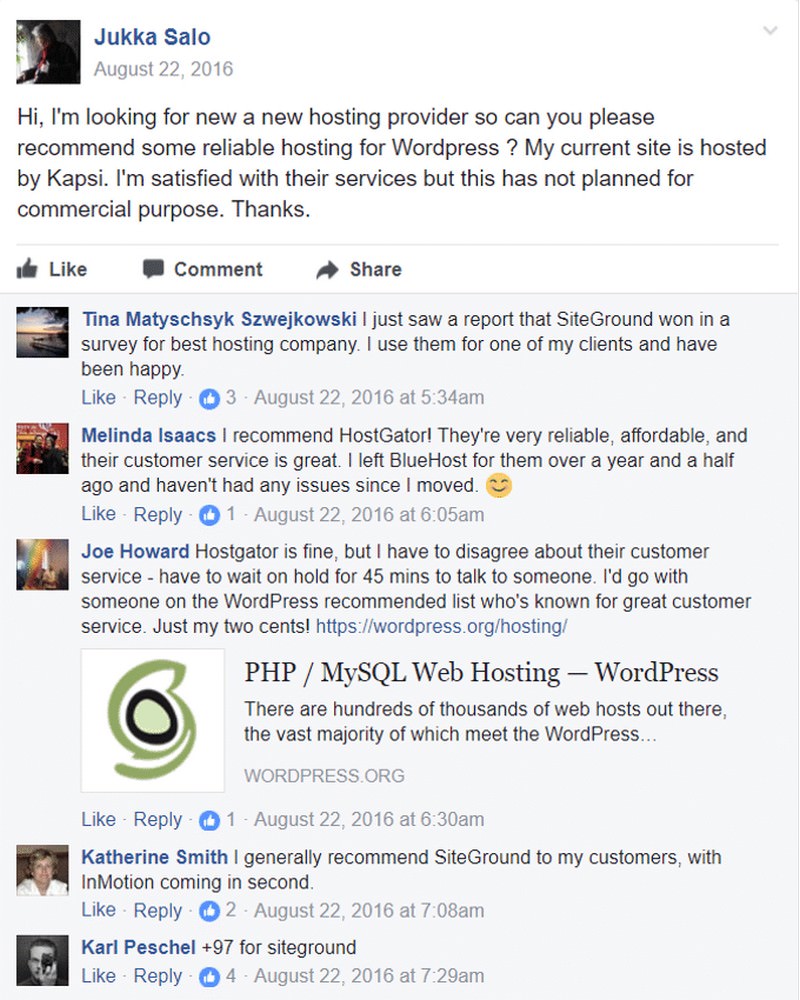
Ivica runs WordPress Speed Up Facebook Group and ranks them #1 in his resources page. He isn’t a SiteGround affiliate or is sponsored by them but only been a customer for years.


Apart from many polls conducted on Facebook, as shown above, SiteGround also obtains perfect scores and ratings from numerous trusted hosting review sites such as HostAdvice, HostSearch, Trustpilot, etc (you can click each image to see the review).


back to menu ↑
2. StartUp vs. GrowBig vs. GoGeek
The main difference is StartUp can solely host 1 website but nevertheless comes with tons of features. GrowBig includes more server resources (faster website), priority support, and 30 daily backups (instead of 1 with StartUp). GoGeek includes even more server resources (considered semi-dedicated hosting) and you can create a staging site to test code, plugins, designs, before releasing. All higher plans include everything in the previous lower plan.
Here’s the full comparison chart:

Here’s a breakdown of each plan:
StartUp – Cheapest plan at only $3.95/month, it’s just enough to host one website with very little traffic. Nonetheless, it’s better than any other hosting plan at $3.95/month available but lacks additional server resources, large storage space, priority support and the exceptional backup tool that you get with the other plans (even though you still get a free daily backup). In my own experience when using this plan, I’ve got 99% uptime and thoroughly no internal server or other hosting errors.
- Hosts 1 website
- ~ 10,000 visits a month
- $3.95 a month
- All essential features
- 10 GB space
- Free SSL from Let’s Encrypt!
- Most suitable for someone who started their first website
GrowBig – At $5.95/month the GrowBig plan is the most popular one, and for good reason, it’s the best choice for your money for anybody who starting in the online business industry. It allows you to host lots of websites, has almost 2x server resources compared to StartUp, double storage space, priority support, staging plus includes 30 daily backups and backup restoration tool.
There is advanced caching if you use the SG CachePress plugin, but as I mentioned in my WordPress speed optimization guide, I prefer to use W3 Total Cache or WP Rocket.
- Hosts unlimited websites
- ~ 25,000 visits a month
- $5.95 a month
- All essential features
- 20 GB space
- Free Wildcard SSL certificate for a year
- About 2x server and email resources
- Priority support
- Backup & restoration service
- WordPress special cache
- 3 levels of SuperCacher
- Best bang for the buck for someone who has multiple websites
GoGeek – Considering using Semi-dedicated, GoGeek has around 4x faster than standard shared hosting! At a fraction of the expense of a dedicated server at $11.95/month. It’s ideal for people who have large websites but don’t want to spend $75+/month on cloud hosting.
It includes all offered at GrowBig along with staging (for testing websites before launching), unlimited restores by SiteGround’s support team, plus essential eCommerce features such as 1-year free Wildcard SSL and PCI compliance for credit card fraud protection.
- Hosts unlimited websites
- ~ 100,000 visits a month
- $11.95 a month
- All essential features
- 30 GB space
- Free Wildcard SSL certificate for a year
- About 4x server and email resources
- Priority support
- Premium backup & restore
- 1-click WordPress Staging
- SG-Git for repository creation
- Pre-Installed Git
- Free PCI compliance
- Fastest shared hosting plan available and mainly for someone who runs large websites
back to menu ↑
3. Host Unlimited Websites
You can host as many websites as possible on your GrowBig account, just ensure you don’t outpace the CPU quota limits or your website could get a penalty to be temporarily shut down (this can happen with any host). For most websites, this shouldn’t be a problem, but I’ve listed several tips below to help prevent it.

In the past, I once encountered this problem on my website, but I was able to resolve it quickly with the help of SiteGround’s incredible support team who helped me better configure the plugins that I used.

Tips on Avoiding CPU Overages
- Use a hosting plan that can handle the needs of your website.
- Monitor your website statistics through AWStats on your SiteGround cPanel.
- Setup Cloudflare and KeyCDN to help reduce too much CPU usage.
- Resize and compress images without compromising quality using the SmushIt plugin.
- Utilize the Wordfence Security plugin to block unwanted bots/IP addresses.
- Enable hotlink protection using W3 Total Cache and Cloudflare combinations.
- Avoid using heavy plugins or extensions which continuously run on your website.
- Install the Heartbeat Control plugin to prevent excessive resource consumption.
back to menu ↑
4. More Server Resources Than StartUp
This means that you’re sharing servers with LESS websites and more resources are dedicated to hosting YOURS. GrowBig comes with around 2x more server resources than StartUp. You can find out this difference on SiteGround’s features page under the “We Allocate the Resources You Need” section, then hover over the “Server” column. When you upgrade plans, you’ll get several improvements simultaneously such as 2x server process, 2x CPU usage, 2x inodes, etc. These are the main factors when it comes to hosting speed. GoGeek has even more, but it’s a higher price leap while GrowBig is just $2/month more than StartUp.

Here’s the number of server resources included in each plan:

back to menu ↑
5. <1s Load Time & 99.99% High Uptime
Speed is crucial for my website! I always try and make sure that my website runs as fast as possible and having a good host is vital in that equation.
SiteGround’s speed technology is one of the main reasons why I chose them. They employ the latest NGINX servers, solid states drives (SSDs), PHP7, Cloudflare CDN, and HTTP/2 enabled servers. In other words, it has the best tech for your website; qualified hardware and software!
I’ve analyzed uptime, speed and overall performance of the SiteGround test site.
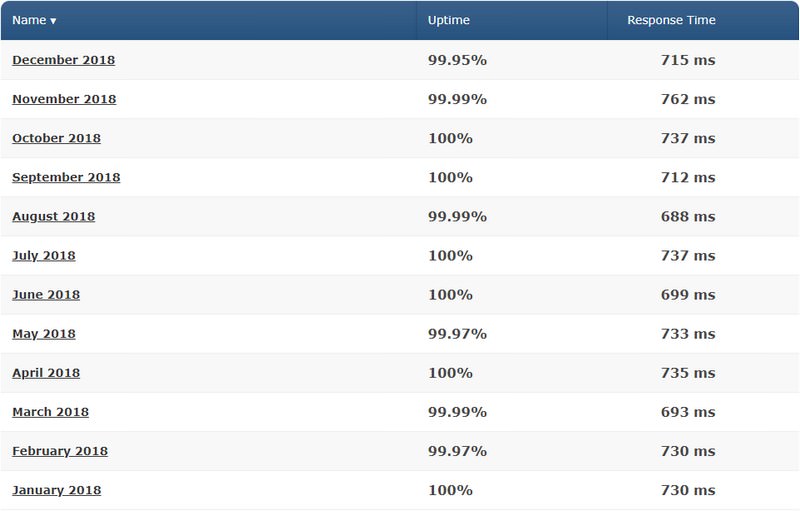
From the analysis of the test site has been set an average uptime of 99.99%, which is 0.2% better than the 99.79% industry standard which is just what they guarantee their customers.
In case you’ve ever experienced internal server errors, bad gateways, connection failures, and other messages when your website goes down, you’ll never get this with SiteGround. Other WordPress hosts say 99.99% but neglect to deliver. Not for SiteGround.
Within the same 12-month period, it found average page loading times of 722ms – faster than the 890ms average load times I came over from other web hosts.
That’s very good, one of the fastest I’ve ever seen.
It was very constant too. There’re no surges or slow loading times at all. Until now, so good.
Overall, SiteGround is pretty fast.
I initially used Bluehost but was disappointed a few times. My website often didn’t load fast and sometimes I was getting internal server errors. Since I migrated to SiteGround I was able to see a striking difference in my Pingdom scores, but also by clicking through my pages (give it a try)! I don’t need to worry anymore about my website getting “randomly” shut down.
SiteGround Speed Optimization Features
Here are several of the main features that SiteGround has to speed up your website speed:
SiteGround Has Faster Load Times
My WordPress site loads only in <1s on SiteGround, and I’m not the only one who gets it. Here’s a chart which compares the average load time of websites running on several of the most popular hosting providers.

4 Data Centers
SiteGround currently has 4 data centers (Chicago, London, Amsterdam, Singapore) so depending on where your visitors come from most, you can choose the data center that is closest to those visitors.

Cloudflare CDN
Don’t forget to activate Cloudflare on your cPanel that can help make your website run even faster. This comes for free with all SiteGround web host plans, but make sure you do this.

Also turn on aggressive caching, minify code, and Railgun to make even faster load times.

WordPress Caching
If you’re running WordPress, I would recommend using W3 Total Cache or WP Rocket instead of their built-in SuperCacher. These plugins have lots of better reviews and integrate with Cloudflare + KeyCDN combined which can assuredly reduce your load time in multiple seconds.

Your hosting and cache plugin are the two most crucial factors when it comes to WordPress site speed optimization.
back to menu ↑
6. Let’s Encrypt & Wildcard SSL
Free Let’s Encrypt SSL – All plans include a free Let’s Encrypt SSL certificate that you can find on your cPanel dashboard.
Wildcard SSL – GrowBig and GoGeek come with a Wildcard SSL certificate for 1-year, that secures your website and its subdomains while giving you a site seal to display on your website. After the first year of usage, it’ll cost $89/year.
Shopping Carts – SiteGround supports major shopping cart platforms such as Virtuemart, Magento, Prestashop, WooCommerce, etc. They also have an eCommerce hosting plan that is devoted to the best shopping cart performance.
back to menu ↑
7. GrowBig is Good for Whom?
- You want to host unlimited websites.
- You need more server resources for faster websites.
- You want 30 daily backups instead of 1 as you get with StartUp.
- You want priority support to handle tickets in less than 10 minutes.
- You need 20GB of storage instead of 10GB which included with StartUp.
- You need 2000MB of email storage rather than 1000MB with StartUp.
- You want to employ SiteGround’s 1-click backup and restore tool for your convenience.
- You want to use advanced caching, even though plugins like WP Rocket do a better job.
- You want a free Wildcard SSL for 1-year (secures your eCommerce site’s subdomains).
- Your website has at most 25,000 visits/month and doesn’t need a ton of high resources.
When to Upgrade to GoGeek?
- You need semi-dedicated hosting with even more server resources.
- You want staging to test designs/code on a demo (staging) site before launching.
- You want a free backup/restore service by the SiteGround team when needed.
- You need PCI compliance on your eCommerce site to prevent credit card fraud.
back to menu ↑
8. Better Customer Support with Priority Support
The one thing that SiteGround users like most is their customer support, and looks like I’ll also be one of them! SiteGround has some of the best customer support I’ve ever met.
SiteGround’s GrowBig plan included with priority support to help you resolve issues faster. I wouldn’t take GrowBig only for its priority support since the regular support is equally helpful (and still very fast), but that’s just another perk of GrowBig.
With priority support, chat support can normally solve your issue in just 5 minutes:

Then tickets are usually answered only within 8 minutes:

As you can see from the pictures above, SiteGround is super fast in answering any chats and tickets raised! That’s the fastest in the industry!
You will no longer need to wait up to 30 minutes for someone to help you (like Bluehost). SiteGround’s support mostly responds tickets in less than 10 minutes with priority support. Even if you don’t have priority support, they can still be super helpful and knowledgeable about WordPress plugins, Joomla extensions, etc. For several times, I’ve had to contact SiteGround customer support and amazingly they always took the time to dig up into my website and really solve the issue. That makes a big difference.
I usually get an answer within a few minutes after submitting a ticket:
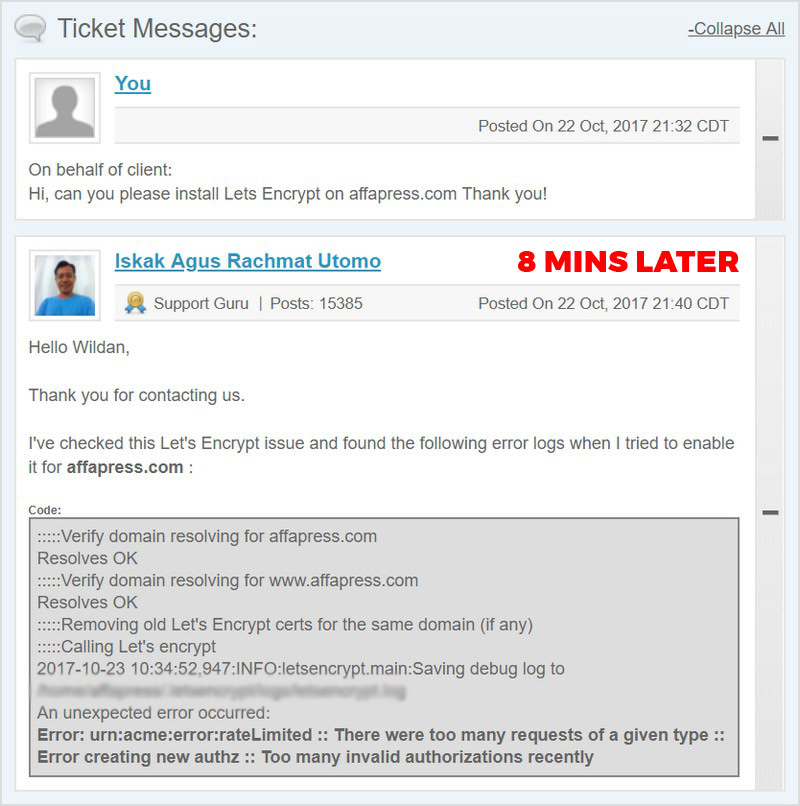
It had been such a pleasure, that they’re one of the only web hosts I’ve analyzed to get a flawless 10 out of 10 in support.
Looks too good to be true? Even after conducting a background check and surveying other sources, I still couldn’t find any negative responses about their support.
Still not believing? Here are some compliments about their support from Twitter:

back to menu ↑
9. cPanel Demo
If you’re not currently hosted with SiteGround and are curious to see a cPanel demo, this can help you to explore the various options after you purchase a SiteGround plan. You’ll see many useful features like WordPress installer, auto updates, staging, Cloudflare, mail options, and a lot of other features that make your website run smooth and load fast. That includes tools for WordPress, Joomla, and Drupal.

back to menu ↑
10. Free Website Migration
A website transfer is included for free in the GrowBig plan. SiteGround will migrate you free of charge even though it’s impossible to guarantee there should be 0 downtimes thoroughly. This process will need at most 24 hours, in comparison this process may be paid or may take up to 30 days with other hosts.
The simplest way to request a site transfer is to do so when you initially sign up SiteGround. Simply click “Transfer an existing website” in the “Account Setup Wizard”.

You additionally have the choice to request a website transfer through the support section of your SiteGround Account.
This is an incredible feature if you decide that you would like to transfer your website later. Just navigate to “User Area > Support > Request Assistance from Our Team” and click on the “Proceed to contact us here” link.
Then, choose “Transfer Website”.

Further, it’s important to note that SiteGround can only transfer the files and databases of a single website without your email accounts and other account settings if your previous web host isn’t running cPanel.
You also have the choice to transfer your website to SiteGround manually, but I recommend taking benefit of the free transfer that is included with your plan.
back to menu ↑
Final Thoughts
It’s absolutely a great value for $5.95/month. This plan is far better than the plans offered by other web hosting providers out there.
You can always upgrade to the GoGeek plan, just ensure if you go with GrowBig, it comes with adequate server resources to host your website(s).
GrowBig is a perfect choice if your website serves less than 25,000 visitors every month. No downtime, no slow page loading issues, and managed WordPress hosting makes it an incredible web host plan. Free website migration in less than 24 hours is a helpful feature that none other web hosting service offers for free.
I don’t think you’ll find a better web hosting choice than SiteGround to spend your money.
I hope that my SiteGround GrowBig review could help you choose the right web host plan. If you still have any questions, drop me a line in the comments below!
Get SiteGround WordPress Hosting
Pros
- Allows to host unlimited websites
- Faster loading website since it has more server resources than StartUp
- 30 daily backups (instead of 1 that included with StartUp)
- Backup & restore tool makes restoring your website much easier
- Free Let’s Encrypt SSL + Wildcard SSL for 1-year (for subdomains)
- Advanced caching if you’re using SiteGround’s built-in SuperCacher
- Fast responses to chat and tickets with priority support
- They will migrate your hosting for free only within 24 hours
- Only $2 more than StartUp, and is significantly less than GoGeek
Cons
- GrowBig still has less server resources than GoGeek
- CPU limits may not be enough for multiple large websites
- Doesn’t come with staging and other GoGeek features
Subscribe To Our Newsletter!