Choosing the right web hosting service can be a nerve-wracking experience since hosting can make or break your website. You need to spend hours doing research, trying to comprehend what sounds like gibberish and then comparing one by one the features offered by all these companies.
Both SiteGround and GoDaddy are hugely popular hosting service providers, counting immense users bases and millions of dollars in profit. They are rivals in the actual sense of the word, always trying to entice the customers away from each other.
This my expert head-to-head comparison will help you make it easier to choose between SiteGround and GoDaddy. I’ve done all the necessary testing so you don’t need to do it again and you’ll find an extensive SiteGround vs. GoDaddy hosting comparison below to help you choose the best among them.
Affiliate Disclosure: This article contains affiliate links, which means Affapress earns a small commission whenever you end up purchasing products we recommend. However, the opinions written are only based on our experience and not how much they pay. Please continue to support our work and learn more about our affiliate links policy.
1. SiteGround vs. GoDaddy (Users Polls & Reviews)
WordPress Hosting is a closed Facebook group with over 10,000 members focused on WordPress hosting solely.
Every year members are asked to vote for their preferred web hosting. Can you figure which WordPress hosting company got the most votes?
That’s right. SiteGround has been voted as #1 WordPress hosting for two years in a row now (#1 in 2017’s poll and #1 in 2016’s poll). It included over 350 voters who are proficient in WordPress hosting.
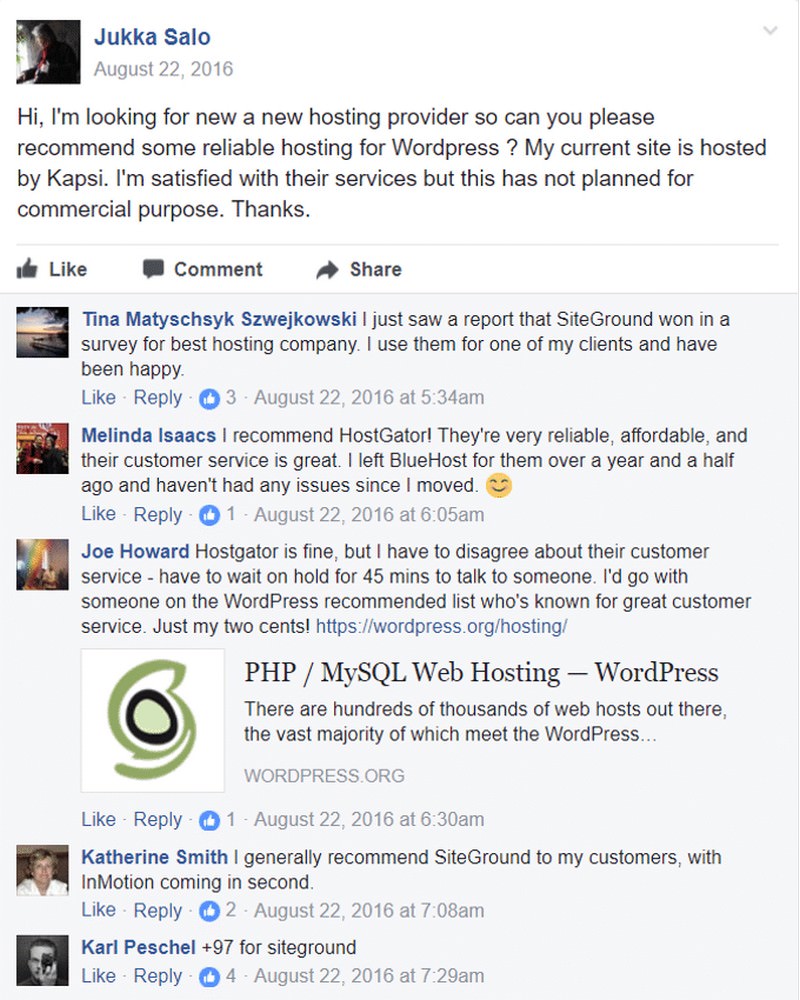
SiteGround was also rated #1 in numerous other polls by various WordPress Facebook Groups (you can click each image to see the poll) whereas GoDaddy was almost nowhere on the map.


In various discussions, there’s also many who recommend using SiteGround.


Ivica runs the WordPress Speed Up Facebook Group and ranks SiteGround #1 on his resources page. Ivica isn’t a SiteGround affiliate or is sponsored by them, he’s just been a customer for many years.


Apart from many polls conducted on Facebook, as shown above, SiteGround also obtains perfect scores and ratings from numerous trusted hosting review sites such as HostAdvice, HostSearch, Trustpilot, etc (you can click each image to see the review).


back to menu ↑
2. Why I Do Like SiteGround
- They are officially recommended by WordPress.
- They use PHP 7.3 (check your version here).
- They use HTTP/2 servers (check your version here).
- They explicitly list what speed technology they use on their page.
- Average load time is super fast which is 1.3s, giving most people instant speed boosts.
- I frequently get 100% uptimes, but 99.99% is guaranteed.
- Making GTmetrix/Pingdom scores much higher (my biggest reason).
- Consistently become #1 in Facebook polls/discussions (#1, #2, #3, #4, #5, #6, #7).
- Free Let’s Encrypt SSL certificate.
- Easy 1-click Cloudflare activation through the cPanel dashboard (view cPanel demo).
- SG Optimizer plugin helps keep your PHP updated with the latest version.
- Managing automatic daily backups, WordPress updates, and security updates.
- Exceptional support (tickets generally answered within <10 min).
- I can call them 24/7 and they happily answer my questions (1.800.828.9231).
- Weekly security email notifications.
- Their semi-dedicated plan is affordable and also much faster than shared hosting.
- Have great eCommerce hosting with cutting-edge features.
- They will migrate your website for free with a 30-day money back guarantee.
The list above are several reasons why I prefer SiteGround, but to ascertain who the real winner is, I’ll do a SiteGround vs. GoDaddy head-to-head comparison more deeply. Take a good look!
back to menu ↑
3. SiteGround vs. GoDaddy – Popularity
GoDaddy Inc. is an American web hosting company that is widely used to purchase domain names. They were founded in 1997 in Baltimore, Maryland and currently have more than 6,000 employees worldwide. They have a mixed review when it comes to web hosting with so much negative review surrounding them. But even so, they remain the single largest web hosting company empowering 6.7% of total websites in the world.
SiteGround was founded in 2004 and now employs more than 400 people. They solely focus as a web hosting service provider. Their numbers are indeed not as big as GoDaddy, yet their growth in recent years is mindblowing. In 2016 they only hosted around 500,000 websites, but at the end of 2018, they host over 1.8 million websites which is an almost 4x increase in the last 2 years. This Bulgarian company has succeeded in becoming one of the most popular shared hosting services in recent years.
back to menu ↑
4. SiteGround vs. GoDaddy – User Interface
SiteGround provides clients the industry-leading cPanel with many common features (eg., FTP accounts, domain manager, file manager, email accounts, PHPMyAdmin, etc). cPanel is known for user-friendliness, an icon-based layout and has had an excellent reputation for stability since it launched in 1996.
GoDaddy has gone in an interesting direction since they provide two control panel options, cPanel and Plesk. What’s the difference? Basically, both are pretty close in functionality, and each has working demos on their website – it’s a matter just finding out which one works better for you.
The ease and flexibility in using the control panel become a significant factor in successful and speedily development of your website.


Winner: Both have an easy-to-use system, and they are quite intuitive. Tie!
back to menu ↑
5. SiteGround vs. GoDaddy – Hosting Features
There are many features that you should take into account when checking out a hosting provider. But in lots of my experience these are the most relevant for shared hosting:
Storage – How Much Space You’ll Need?
This always becomes the most fundamental factor to take into account. You’ll need to make sure your hosting plan choice has enough storage for your project(s), and a little bit extra.

I must say that 10GB of storage is plenty for most projects unless you’re planning to upload lots of HD images and large videos.
Winner: GoDaddy’s entry-level plan (Economy) already offers more storage compared to SiteGround’s higher plan. If you need lots of space, GoDaddy can be a better option.
Sidenote: SiteGround utilizes SSD as their storage drives. These are assuredly more expensive but also much faster than traditional hard drives (like the ones GoDaddy uses). Similar to comparing a Ferrari with a bus, the first won’t fit more than 4 or 5 people but will be much faster than the latter.
Bandwidth – How Many Visits Will You Get?
This refers to the amount of traffic that your website will be allowed to receive. More often than not, hosting providers try to limit your website visitors, so you’re forced to upgrade your plan to a higher one.
Winner: Good news here! Both SiteGround and GoDaddy don’t have any bandwidth limitations – so you can get as much traffic as possible.
Domains, Subdomains & Parked Domains
SiteGround will allow you to create as many subdomains as you need. You’ll also be able to park unlimited domain names with all their plans. However, for a new domain name, they don’t offer it for free upon registration, you’ll be requested to pay for it (or buy it elsewhere) – domain names start around $12 per year.
GoDaddy does offer a free domain name with all their plans. You’ll also be able to park unlimited domain names. Be aware that they limit to 25 subdomains with their entry plan, but there are no limitations with the higher plans.

Winner: Since GoDaddy offers a free domain name on every purchase on all their plans, this point is for them.
Email Accounts – Receive & Send Emails
SiteGround comes with unlimited email accounts and per account has a maximum space for each plan up to 2GB, 4GB, and 6GB. You can set up forwarders and aliases for each of your accounts. Their cPanel comes with 3 emails clients to conveniently manage your accounts: Horde, SquirrelMail, and RoundCube.

GoDaddy offers nigh the same – it even uses the same webmail clients. The only difference is that GoDaddy imposes limits on their Economy and Deluxe plans to 100 and 500 email accounts respectively. But for their higher plans offer unlimited accounts and storage.

Winner: SiteGround and GoDaddy offer almost the same features. In my opinion, both are equally good. Tie!
FTP & SFTP Accounts
Both SiteGround and GoDaddy allow you to create FTP accounts as many as you need. Using SFTP is not a problem for SiteGround. GoDaddy also allows to use SFTP, but only for the main FTP account.
Winner: Once again they are pretty equal, so one point for each.
SSL & HTTP/2
To improve your website security and SEO rankings, having an SSL enabled (https) and running your website over HTTP/2 can be very helpful. So hosting providers that offer these features out-of-the-box are one step ahead of their competitors.
SiteGround offers free SSL certificates (via Let’s Encrypt) and HTTP/2 on all their plans.
Whereas GoDaddy only offer free SSL certificates on their Ultimate plan and above. Moreover, they don’t offer HTTP/2 on all their shared hosting plans.
Winner: SiteGround completely wins this round.
Git & SSH Access
These technologies make programmers easier to deploy and keep track of the changes made (especially when working in teams).
SiteGround has developed their own cutting-edge SSH access system, thus allowing you to be able to gain admin access to your account and that’s extremely convenient for managing big files. On top of that, you can also set up a Git repository to enable version control on your projects – best practice among pros.

While GoDaddy also offers SSH access, sadly the Git repository isn’t available with their shared hosting plans.
Winner: This round goes to SiteGround!
WordPress Managing
Most of us use the WordPress platform as the chosen CMS, which is not surprising since WordPress is currently the most popular CMS platform in the world. Therefore having a server optimized for WordPress and tools that enhance productivity can be very great. Let’s check the main WordPress features that you’ll get with both hosting providers:

*Staging area: This is like a sandbox area where you can try out to make code changes without having to affect the production site.
Winner: SiteGround completely wins this one.
Let’s Do A Features Recap
- Both providers offer equally good at: bandwidth, email accounts, FTP & SFTP accounts.
- GoDaddy is more generous with much larger storage.
- And SiteGround beats out GoDaddy at: backup & restore, SSL & HTTP/2, Git & SHH access, and the WordPress features.
Winner: The hosting features section point falls into SiteGround’s hands too.
back to menu ↑
6. SiteGround vs. GoDaddy – Speed
SiteGround’s emphasis on offering top-level performance has led them to use SSD servers, latest software releases, their own inbuilt caching system known as SuperCacher, OCSP Stapling method, etc.
- SSD storage is much faster and more reliable than traditional HDD drives. Therefore, utilizing SSD drives have become a benchmark for top web hosting companies, and SiteGround being one of the first to adopt this technology.
- Moreover, SiteGround SuperCacher can significantly help in boosting the speed of your website by providing 3 caching layers known as Static, Dynamic and Memcached. My test has proved that website using Supercacher loads faster than the normal websites.
- More than 32% of websites powered by WordPress and PHP is an integral part of WordPress. Luckily SiteGround regularly releases the latest PHP version instantly upon their official release. That said, the latest PHP releases can help in increasing speed and reliability of the website.
These features help SiteGround to offer the highest performance among all the web hosting companies today.
On the other hand, GoDaddy has managed to address previous speed issues and starting in 2018 they have used AWS (Amazon Web Services) to host their entire website and services. AWS is a highly reliable cloud platform with experience in hosting and managing data for over the last 12 years. This transition has successfully helped GoDaddy websites to perform better lately. However, when compared to SiteGround it loads very slowly.
I tested the speed of website hosted under SiteGround and GoDaddy to specify which hosting is faster.
To do this, I used the concept of TTFB (Time to First Byte) which refers to how quickly the host’s server sends the first byte of data when responding to a request. This is an important metric since it allows us to be able to test the speed and quality of the servers independent of front-end issues.
The speed at which the server delivers the first byte of data won’t be affected by the website type, it’s size or also other similar factors. So, it can be the most appropriate way to find out the quality of the hosting company’s servers.
From the following tests show that SiteGround had an excellent TTFB of 308 ms, whereas GoDaddy’s was largely disappointed with very high TTFB of 732 ms.


It’s clear that SiteGround is the winner with 2x faster than GoDaddy in terms of TTFB. SiteGround is superior to GoDaddy when it comes to website speed.
Here’s an interesting tweet from one of the SiteGround users. He showed that his website was loaded 2 seconds faster instantly after transferring to SiteGround.
That’s genuinely a remarkable difference!

Load time less than one second for a web page which is 2.0 MB in size is excellent even after optimization.
Besides that, here’s a why website hosted on SiteGround can be faster than GoDaddy:
Multiple Data Centers
One of the advantages of SiteGround which is my favorite is that they have more than one data center location. They have 4 global server locations including in the US (Chicago), the UK (London), the Netherlands (Amsterdam), and Southeast Asia (Singapore).

One of the most effective ways to boost your website speed is to place your website’s files on a server located near your target audience. As instance, if your website has most traffic coming from the UK, try to buy a hosting who have their servers in the UK area like London.
Not only that, SiteGround makes it very easy to change server location whenever you want. So, no need to worry in case you still don’t know the location of your audience.

While GoDaddy is pretty tight-lipped about their infrastructure. Based on the information I got they have at least 9 data centers, there’s a data center located near their headquarters in Phoenix, with two additional Arizona centers and others in Chicago, Ashburn, Virginia, Los Angeles, Amsterdam, and Singapore.
GoDaddy also offers a similar approach to SiteGround which can make it easier for you to change server location whenever you want.

Winner: As you can see from the tests above, SiteGround performed way better than GoDaddy. So this crucial point goes to SiteGround.
back to menu ↑
7. SiteGround vs. GoDaddy – Uptime
Along with the hosting speed, uptime is arguably the most critical performance metric. Uptime is the amount of time your website is up and running to your visitors. There are many chances that allow your website to be inaccessible to your visitors as a result of hardware failure, server maintenance, power shutdown, etc. by your web hosting company. That’s why this test is crucial since less uptime can bring huge losses to your business through loss of credibility, sales, Google rank, etc.
SiteGround states that they have a guarantee of up to 99.9% uptime. This guarantee applies across the board, no matter which plans you currently have. Much of their strength lies in their own custom programming, such as a detection system they built which “sniffs out” potential downtime issues and then corrects them automatically.
Similarly, GoDaddy also guarantees to deliver 99.9% uptime. It gives customers a particular percentage credit off their monthly hosting bills in case the company is unable to meet this standard. It’s called the “Service Uptime Guarantee”, the credit must be applied to company services. However, the company becomes judge and jury, and only those who have the right to determine whether the customer met the guarantee or not.
The test I conducted by using Host Tracker to help monitor roughly 150 SiteGround and GoDaddy websites to determine a more accurate figure for their uptime.
And the result shows that website hosted under SiteGround seems to be scoring high with 99.99% uptime, whereas GoDaddy struggled with a high amount of downtimes which puts their uptime below 99%.

To see the real time for uptime percentage, you can use this Live Hosting Uptime Tracking tool. You can change the date variable to display the interactive graph that you want.
Then to be more convincing, I went deep and tracked the uptime of a personal blog hosted under SiteGround and GoDaddy, and the results were as expected.

GoDaddy recorded a downtime of 2 hours during my testing. Meanwhile, SiteGround downtime was only 5 minutes.
Winner: SiteGround is the winner here, beating GoDaddy with a significant uptime margin.
back to menu ↑
8. SiteGround vs. GoDaddy – Security
SiteGround comes with SFTP, SSL, and SSH access, all these features are crucial security-wise. Moreover, they also employ PHP 7.3 which is the latest version (apparently it’s a more secure version), monitoring the traffic to block brute force attacks and updating their security rules regularly every week. They also sell SG Site Scanner which is an add-on to scan your website looking for hidden malware – it costs $1.65 extra a month.

Honestly, GoDaddy offers an almost similar approach with SFTP, SSH access, PHP can upgrade to 7.2, and SSL (only for Ultimate plan and above). They have an extensive 24/7 security monitoring to thwart suspicious activity and deflect DDoS attacks.
Besides that, they also do offer Website Protection plans which are their own high-quality security solution, but at a hefty price to drain your pocket – it starts at $6.99 per month.

On the other hand, SiteGround was the first hosting company to implement a unique isolation system that ensures each account on a server is isolated from all others. So if someone else’s website becomes compromised, yours will remain safe.
Websites are secured against hackers because every time you log into cPanel, you’ll be guided into SiteGround’s encrypted server.
Moreover, SiteGround has recently developed an advanced anti-bot AI that serves to protect their customers from brute-force attacks.
The new bot prevention system has given incredible results since it managed to block as many as 2 million attacks across their servers. It not only protects the customer’s websites but also frees up server resources that can now be utilized by customers.
The AI system works by monitoring all SiteGround’s servers simultaneously and analyzing data in depth. Based on the results, it takes its own action automatically to stop malicious bots. Some of the flags which AI watches include:
- Failed logins
- How many simultaneous connections are present to different URLs
- DDoS weaknesses that are already known in different apps
- Various request types that associated with DDoS attacks
- A continuously updating list of blacklisted user agents
When the AI system decides that an IP is malicious, the AI system would block it and gives a challenge through a Captcha page. If the “puzzle” is successfully solved, meaning that it’s indeed a human and not a malicious bot, then the address will be whitelisted. And the AI learns from these situations continuously so that it can reduce the level of false positives that might occur.
Thus, SiteGround’s security system is more reliable in protecting the customer’s websites.
Winner: SiteGround wins by a long-shot as they’ve developed their own unique isolation system and advanced anti-bot AI to block brute-force attacks.
back to menu ↑
9. SiteGround vs. GoDaddy – Server Quality
To test how the servers of each host will react when getting a large number of simultaneous visitors, I utilized the Load Impact app. This test will show the performance of each host server when there are 100’s of visitors coming at the same time to your website.
Here are some of the steps taken to make sure all tests can be as fair as possible:
- Each website must have a WordPress 4.0 installation running on it, using the same theme, and have the same number of images, page size, content, and requests.
- All existing plugins and catching systems were disabled.
- The test was performed several times, and the best results are displayed here.
- Both of these host servers I tested are located in Ashburn, VA, and Portland, Oregon.
The green line indicates the number of visitors, while the blue line represents the contiguous response time when there are increases in traffic.
SiteGround Server Response Time
SiteGround clocked a 515ms response time throughout the test, the blue line (which indicate response time) remained flat for up to 100 concurrent visitors. This means the number of visitors and their multiple requests have no significant impact on the response time of SiteGround servers.
Siteground servers were genuinely stable and performed with high quality even when there was heavy load applied to the servers.

Take a look at the source and full test results from Load Impact for SiteGround.
GoDaddy Server Response Time
GoDaddy has made lots of improvements over the years, but have a tremendous challenge on server response time due to their enormous customer base. They clocked a response time of 1.3s until concurrent visitors reached 50. After that, response time started varying greatly and finally, server stopped responding to 80 concurrent visitors. This shows their inability to handle a large number of visitors coming to your website at the same time.

Take a look at the source and full test results from Load Impact for GoDaddy.
Winner: Based on the test results above, the conclusion is that SiteGround’s approach gives them far better results than GoDaddy’s stressed system.
back to menu ↑
10. SiteGround vs. GoDaddy – Site Migration
Migrating a website from one host to another can be difficult, notably if it’s your first time.
SiteGround offers free migration of your website from other servers to their servers (with their GrowBig and GoGeek plan). Their expert technicians will transfer your website without even a single minute of downtime within a few hours of purchase. With the StartUp plan, you can still request a migration too, but it would cost $30 per site migration.

GoDaddy doesn’t offer site migration service on their shared hosting plans, but on all their managed WordPress hosting plans, they offer it free for your WordPress site.
Winner: SiteGround does a better approach here as they offer the service on all their hosting plans and aren’t limited to WordPress sites only.
back to menu ↑
11. SiteGround vs. GoDaddy – Scalability
It’s important that your hosting can grow along with you. It won’t be fun if your website gets successful overnight but your hosting provider fails to accommodate your traffic increase.
In case the SiteGround GoGeek plan is still not enough for your needs, they have a couple of options that you can check out:
- SiteGround Cloud Hosting: This starts at $80/month. This can be a more flexible solution than shared hosting since you can add more resources (eg., storage, RAM memory, etc) with just 1-click. An ideal choice to cope with traffic peaks. Noteworthy that the bandwidth is limited to 5TB – but this is very much.
- SiteGround Dedicated Servers: For those who need even more resources, yet this isn’t cheap – starts at around $269 per month. The storage, RAM memory, and processing power are the most upgrades here.
- SiteGround Enterprise Hosting: If you completely need server resources are so big that you have to use a tailored solution.
- Reseller Plan: In case you are a developer yourself and manage your client’s websites, you might be interested in their reseller plan.
GoDaddy also offers several alternative plans besides their shared hosting:
- GoDaddy Business Hosting: Plans that are similar to the shared hosting, starting with a price around $29.99/month – you’ll get the dedicated resources, power, and performance of VPS but with an easy-to-use control panel.
- GoDaddy VPS: Their VPS plans come with more processing power and better security – start at around $29.99/month.
- GoDaddy Dedicated Servers: For about $170 per month, you’ll have a server yourself. This is suitable to cope with large projects that need a high-performance boost.
Winner: Both SiteGround and GoDaddy offer similar advanced solutions (eg., dedicated servers). Tie!
Sidenote: Honestly, I’ve never had to use anything other than their shared hosting plans. So I can’t tell how good or bad SiteGround and GoDaddy’s advanced solutions are.
back to menu ↑
12. SiteGround vs. GoDaddy – Backup & Restore
Personally, this is the most important feature that I consider when choosing a web hosting.
Why can backing up your website be that important?
- Protects from cybercrime like a website hacking.
- Protects our website from being broken as a result of accidental human error or wrong software updates.
- Helps in restoring website that infected with malware or other viruses.
Most hosting companies don’t provide regular backups unless you’re willing to pay extra bucks for that service.
However, that’s not the case with SiteGround since they provide automatic daily backups. You can also restore the backup whenever you want with just 1-click, and it only takes about two minutes of waiting time.
Not only that, SiteGround allows us to create an additional backup on demand. This is very useful as you can backup all the files before making any major changes to your website.
Here’s how SiteGround backup and restore tool will look and work. It can be accessed easily with just 1-click from cPanel.

GoDaddy doesn’t provide automatic backup on their shared hosting plans. You must be willing to pay extra costs to get their premium website backup solution which starts at $2.99 per month.
But for their managed WordPress hosting plans, automatic daily backups are included at no extra cost. You can restore these backup files with just a few clicks through the GoDaddy customer dashboard, and when doing so, you can select one of the options to restore files, database or both.
Here’s how GoDaddy backup and restore tool will look and work.

Winner: Both SiteGround and GoDaddy provide a reliable backup and restore service. But this point goes to SiteGround since they offer the service for free on all their plans (except entry-level plan).
back to menu ↑
13. SiteGround vs. GoDaddy – Customer Support
Customer support is the most crucial aspects in dealing with day-to-day problems related to websites including downtime, server connectivity, or security issues.
SiteGround provides 24-hour support via phone, email (ticket) and live chat. Their support has always been friendly to me, given a solution and been super fast. So far, they provided the best support I’ve ever had from a hosting company – I know it’s an overbold claim, but I stand by it.
Whereas GoDaddy in the past suffered lots of customer support issues due to their rapid growth. They have minimized many of those negative issues, and now offers a robust menu of support options, they include telephone support and online knowledge bank. Surprisingly, they opted to eliminate chat and email support, both of which were strong support channels for many other high profile companies in the hosting arena. But even so, this effort seems to be paid off, many of their customers were satisfied with their current support services.
Here are some compliments about SiteGround customer support team from Twitter:

GoDaddy customer support team also gets lots of excellent feedback on Twitter:

Winner: Both have great customer support, but SiteGround remained slightly superior as they have the fastest customer support in the entire web hosting industry.
back to menu ↑
14. SiteGround vs. GoDaddy – Plans & Pricing
Both Siteground and GoDaddy offer reasonable pricing plans for the customers. They also offer huge discounts on selected plans. Still, the renewal prices of both these companies are little expensive. You can make the payment easy and secure way through your credit card or PayPal account. They also offer a generous 30-day money-back guarantee.
Here are SiteGround shared hosting plans pricing:

- StartUp for $3.95/month: Hosting for 1 website, 10GB of storage, unlimited bandwidth, 24-hour support, and their in-house caching system.
- GrowBig for $5.95/month: Hosting for unlimited websites, 20GB of storage, unlimited bandwidth, priority support, and an advanced caching system.
- GoGeek for $11.95/month: Same as the previous plan, plus advanced backup solution, Git repository, and a staging area.
These are GoDaddy shared hosting plans pricing:

- Economy for $7.99/month: Hosting for 1 website, 100GB of storage, 10GB of databases, and unlimited bandwidth.
- Deluxe for $10.99/month: Hosting for unlimited websites, unlimited storage, 25GB of databases, and unlimited bandwidth.
- Ultimate for $16.99/month: Same as the previous plan with unlimited databases and free SSL certificate.
- Maximum for $24.99/month: Same as the previous plan with 2x more CPU, memory, entry processes, and I/O (input/output).
back to menu ↑
Final Thoughts
From several comparison tests conducted above, it can be clearly seen that SiteGround was the winner and was the best hosting choice (especially for WordPress site).
If you actually spend the time reading these Facebook conversations, the decision is clear.


SiteGround’s semi-dedicated plan is legit since it comes with 4x more server resources compared to regular shared hosting (the #1 factor in the WordPress optimization guide). Pingdom and GTmetrix scores are fine and dandy, but load time is the most critical factor.


When comparing SiteGround vs. GoDaddy, it’s assuredly an easy choice. And if you read reviews which spread across the web, you’ll see the same thing – unless they are written by a GoDaddy affiliate of course.
Lastly, if you have any questions about my SiteGround vs. GoDaddy review, don’t hesitate to drop me a line. You can also read my complete SiteGround WordPress Hosting review if you would like to learn more about their cPanel, SuperCacher plugin, more Cloudflare tips, etc. I’ve had an incredible experience with SiteGround and would use them if you need fast and reliable WordPress hosting.

- Readers Rating
- Rated 3.8 stars
3.8 / 5 ( Reviewers) - Excellent
- Your Rating
Subscribe To Our Newsletter!